


Special Operations Software: vendor of Group Policy based Active Directory management software.
Active Directory Janitor helps cleanup Active Directory & increases Active Directory security

Active Directory Janitor - maintenance, cleanup & security
Active Directory Janitor   TM

Cleanup Active Directory today!

Maybe without knowing it you probably have a problem that grows bigger every day. An Active Directory structure that are full of obsolete computer and user objects. Have you any idea of how much information that is replicated around without any reason and slows down daily work? Do you know how this extra load affects your end users? Maybe you are aware of the problem and rely on dangerous scripts or other non-supported third party products?

Use Active Directory Janitor to cleanup Active Directory (delete, move or disable) accounts and increase your Active Directory security and general network performance. The maintenance of Active Directory content needs to be done on a regular basis.
Click here to buy Active Directory Janitor


   Click here to download a trial version of Active Directory Janitor.

Click here and tell us who you are and when you would like a WebEx-demo. Please allocate about 20 minutes for a demo.
Click here for News regarding Active Directory Janitor


Why consider Active Directory Janitor?

  • Maintenance Active Directory
  • cleanup Active Directory (delete, move or disable old accounts)
  • Increased Active Directory Security
Value Proposition

Problem: After deploying Active Directory, most organizations have an ongoing and growing problem tracking outdated user and computer accounts that no longer correspond to actual physical users or computers.


Solution: With Active Directory Janitor you can search the entire network to easily identify these accounts. You can then decide, from a number of criteria, which ones that are outdated and finally delete, disable and/or move them.


Result: The result is an up to date and accurate list of Active Directory resources on an ongoing basis. You will also maintain your Active Directory security level since high security risk accounts will be listed.
Maintenance Active Directory

Active Directory Janitor is very fast to get started with
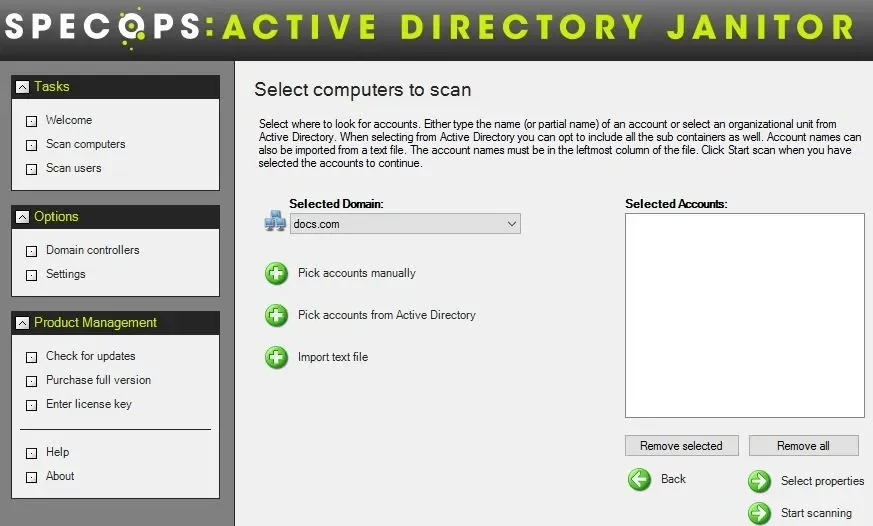
Active Directory Janitor is very fast to get started with. Just select the computers, or users, from Active Directory that you would like to administer/scan and press a button. Violá, all your domain controllers are scanned, multithreaded, in real time and shows you information to make it easy for you to cleanup Active Directory accounts you consider old and obsolete.
 
Maintenance Active Directory security features:

Easy to use standard Windows graphical interface. Easy to use standard Windows graphical interface.
Choose among 35 properties when scanning your network environment. Increase Active Directory security: Choose among 35 properties when scanning your network environment.
Pick user or computer accounts to scan in three different ways: Manually, from Active Directory and import. Pick user or computer accounts to scan in three different ways: Manually, from Active Directory and import.
Delete, disable, move and enable Active Directory accounts in seconds. Perform cleanup operations: Delete, disable, move and enable Active Directory accounts in seconds.
Export all or part of your scan results. Export all or part of your scan results
Identify user accounts with high security risk Increase Active Directory security: Identify user accounts with high security risk
For the non-replicated account properties all domain controllers will be contacted and the most recent value will be used. For the non-replicated account properties all domain controllers will be contacted and the most recent value will be used.
Sarbanes-Oxley Act (SOX):

Are your organization SOX compliant? In the article "SOX and the Single Admin", Redmond Magazine, January 2006, the author Russel Olsen, points out three active directory security controls that needs to be done continuously. The three controls are:

Control #1: Only Authorized Users Have Privileged Access
Control #2: All inactive Accounts are Disabled After 60 Days and Deleted After 90
Control #3: All Users Have Expiring Passwords

All these active directory security controls can be managed easily by the Active Directory Janitor. To read the entire article click here.
Why purchase?

How do you solve your cleaning problems today, how much time does it take per year and how much do you and your manager value your time?
Answer the above questions and $1999.95 U.S. per enterprise license, or $399.95 U.S. for a Small Business license, makes the value proposition of Active Directory Janitor crystal clear.

Clearly, the time invested by IT staff to continually use manual, inefficient, and insecure methods to maintain an accurate AD resource list greatly exceeds the nominal cost of Active Directory Janitor.

Maintaining Active Directory is important since failing to do so will most likely result in unnecessary Active Directory maintenance cost increases.